
Single Pane of Glass for Unified SASE Operations
Enterprises today must manage distributed sites, remote users, cloud applications, and increasing security risks, often with limited staff and budgets. MyAryaka is Aryaka’s unified management portal that brings monitoring, configuration, troubleshooting, and business management into one intuitive experience.
MyAryaka delivers a single operational console for Aryaka Unified SASE, helping IT teams operate faster, smarter, and with greater confidence.
Start Every Day with Instant Insight
The New MyAryaka Landing Page
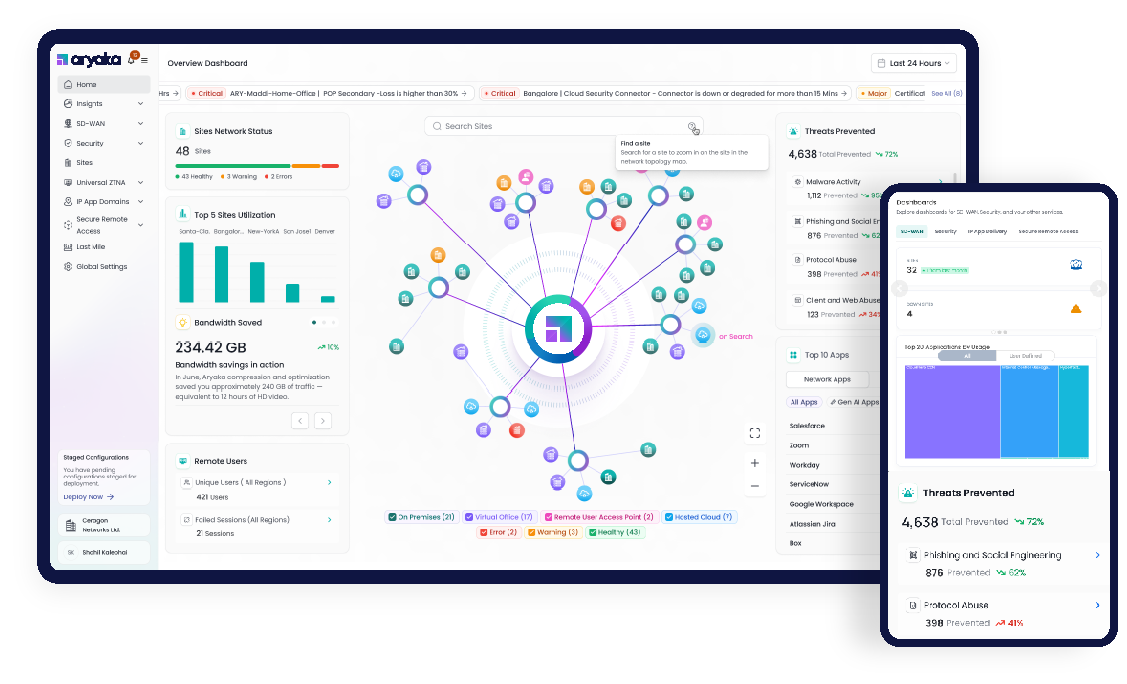
The redesigned landing page acts as a “morning newspaper” for your network and security environment. The moment administrators log in, they receive a consolidated snapshot of service health, security posture, and performance- without navigating through multiple tools.
At-a-glance visibility includes:
- Network Health Overview – real-time view of sites, connectivity status, and POP associations
- Topology Visualization – interactive SD-WAN map with filtering and search
- Critical Alerts Ticker – immediate awareness of major system events
- Site Status Summary – number of operational vs. impacted locations
- Top Utilization Sites – quick identification of bandwidth hotspots
- Aryaka Advantage Metrics – bandwidth saved, speed improvements, and reliability gains
- Remote User Monitoring – active users, failed connections, and drill-down diagnostics
- Security Posture Snapshot – threats blocked, app discovery, and GenAI usage visibility
The result: faster situational awareness and reduced mean time to resolution.
Complete Lifecycle Management in One Portal
Beyond the landing page, MyAryaka provides full operational capabilities across Aryaka services.
Unified Visibility
- Dashboards: Service-specific views for SD-WAN, Security, and Remote Access
- Reports: Monthly SLA, site, and link performance summaries
- Log Explorer: Advanced search and filtering of network and security events with top-talker analysis
Configuration & Control
- Centralized SD-WAN and security policy management
- Ability to configure, validate, and scale changes globally
- Role-based access for distributed teams
Proactive Operations
- Alert Management: User-defined thresholds for utilization, health, and billing
- Audit Logging: Full history of administrative changes for governance
- Support Integration: Open tickets, track cases, and access documentation directly from the portal
Business Administration
- Plan and billing visibility
- Contract and invoice management
- Subscription and usage insights
Key Benefits
- Simplify Operations: One console for network + security – no tool sprawl.
- Faster Troubleshooting: Instant context and deep diagnostics in a single workflow.
- Improved Productivity: Move seamlessly from observability configuration validation.
- Stronger Security: Built-in visibility into threats, risky apps, and user activity.
- Clear Business Value: Quantified performance improvements and bandwidth savings.
Built for the Era of Unified SASE
MyAryaka is designed around two core principles:
Unified Visibility
- Make self-service effortless
- Demonstrate the value of Unified SASE
With an intuitive interface and integrated insights, MyAryaka empowers enterprises to manage connectivity
and security with unmatched simplicity and efficiency.
Get Started
MyAryaka is included with all Aryaka services – no additional tools required. Log in today to experience a
smarter way to operate your network and security.
Aryaka – Secure Networking for the Cloud-First Enterprise
About Aryaka
Aryaka is the leader in delivering Unified SASE as a Service, a fully integrated solution combining networking, security, and observability. Built for the demands of Generative AI as well as today’s multi-cloud hybrid world, Aryaka enables enterprises to transform their secure networking to deliver uncompromised performance, agility, simplicity, and security. Aryaka’s flexible delivery options empower businesses to choose their preferred approach for implementation and management. Hundreds of global enterprises, including several in the Fortune 100, depend on Aryaka for their secure networking solutions. For more on Aryaka, please visit www.aryaka.com.